
获取手机验证码 需要先验证滑块
后台设置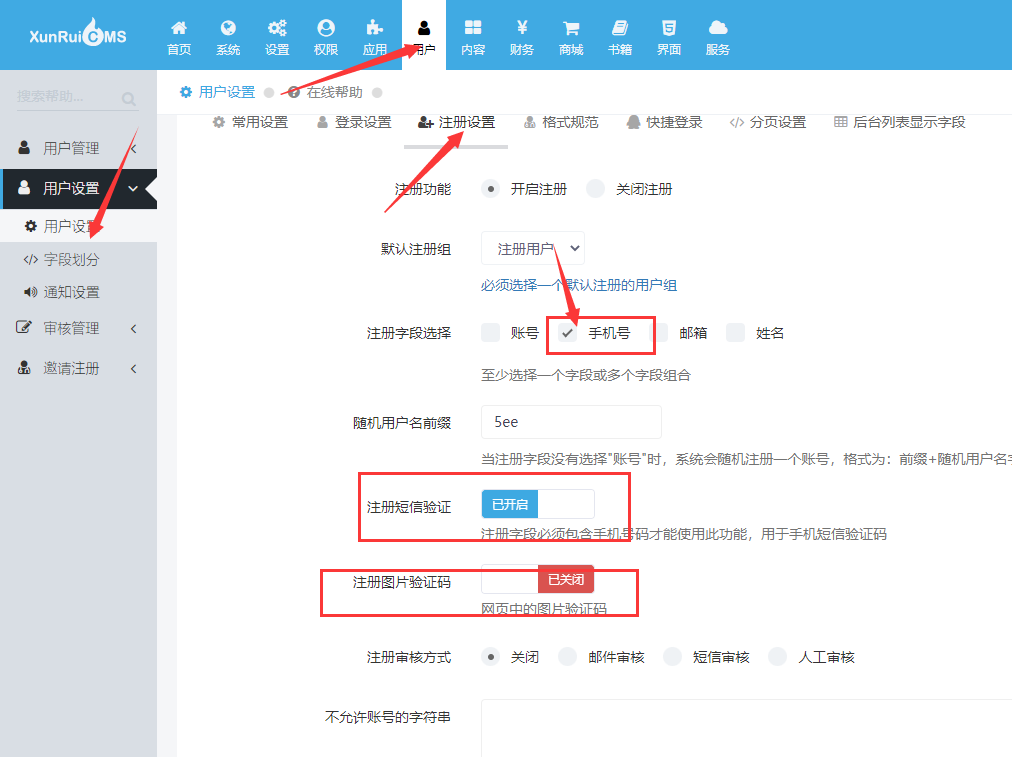
前端代码 template/pc/xx/member/register.html
<div class="portlet-body">
<form action="" class="form-horizontal form" method="post" name="myform" id="myform">
{$form}
<div class="form-body" style="padding-bottom:0">
{if dr_in_array('username', $register.field)}
<div class="form-group" id="dr_row_username">
<label class="col-md-2 control-label">账号</label>
<div class="col-md-9">
<label><input type="text" class="form-control input-large" name="data[username]" id="dr_username"></label>
</div>
</div>
{/if}
{if dr_in_array('email', $register.field)}
<div class="form-group " id="dr_row_email">
<label class="col-md-2 control-label">邮箱</label>
<div class="col-md-9">
<label><input type="text" class="form-control input-large" name="data[email]" id="dr_email"></label>
</div>
</div>
{/if}
{if dr_in_array('phone', $register.field)}
<div class="form-group " id="dr_row_phone">
<label class="col-md-2 control-label">手机号</label>
<div class="col-md-9">
<label><input type="text" class="form-control input-large" name="data[phone]" id="dr_phone"></label>
</div>
</div>
{/if}
{if dr_in_array('name', $register.field)}
<div class="form-group " id="dr_row_name">
<label class="col-md-2 control-label">{MEMBER_CNAME}</label>
<div class="col-md-9">
<label><input type="text" class="form-control input-large" name="data[name]" id="dr_name"></label>
</div>
</div>
{/if}
<div class="form-group " id="dr_row_password">
<label class="col-md-2 control-label">密码</label>
<div class="col-md-9">
<label><input type="password" class="form-control input-large" name="data[password]" id="dr_password"></label>
</div>
</div>
<div class="form-group " id="dr_row_password2">
<label class="col-md-2 control-label">确认密码</label>
<div class="col-md-9">
<label><input type="password" class="form-control input-large" name="data[password2]" id="dr_password2"></label>
</div>
</div>
{$myfield}
{if $register.sms}
<div class="form-group" id="dr_row_sms">
<label class="col-md-2 control-label">短信验证</label>
<div class="col-md-10">
<div class="input-group input-large">
<input class="form-control placeholder-no-fix" type="text" autocomplete="off" id="dr_sms" name="sms">
<div class="input-group-btn">
<button class="btn blue" id='btn' type="button">获取手机验证码</button>
</div>
</div>
</div>
</div>
{/if}
<script src="https://apps.bdimg.com/libs/jquery/1.9.1/jquery.js"></script>
<script src="https://static.geetest.com/v4/gt4.js"></script>
<div id="captcha"></div>
<script>
initGeetest4({
captchaId: "{dr_geetest('xzyz', 2)}", //*对应的极验ID*
product: 'bind', //* 极验代码类型,可自行更改
language: "zho", //*验证码语言 zho 指的是中文
}, function(gt) {
window.gt = gt;
gt.appendTo("#captcha").onSuccess(function(e) {
//对应上方id=captcha 的div控件
var result = gt.getValidate();
var index = layer.load(2, {
shade: [0.3, '#fff'], //0.1透明度的白色背景
time: 100000000
});
$.ajax({
url: '/index.php?s=geetest&c=api&m=login_code&id='+$('#dr_phone').val()+'&cname={dr_geetest('xzyz', 0)}',
//*插件提交页面,需要后台对应的极验的别名,用来获取对应id及key* //*插件提交页面,需要后台对应的极验的别名,用来获取对应id及key*
data: result,
type: 'get',
dataType: 'json',
success: function(json) {
layer.close(index);
if (json.code == 0) {
if (json.data.field) {
$('#dr_row_' + json.data.field).addClass('has-error');
$('#dr_' + json.data.field).focus();
}
}
dr_cmf_tips(json.code, json.msg, json.data.time);
if (json.data.url) {
setTimeout("window.location.href = '" + json.data.url + "'", 2000);
}
},
error: function(HttpRequest, ajaxOptions, thrownError) {
dr_ajax_alert_error(HttpRequest, this, thrownError);
}
})
})
$("#btn").click(function() {
gt.showCaptcha();
})
});
</script>
<div class="form-actions" style="margin-top:30px">
<label class="col-md-2 control-label"></label>
<div class="col-md-9" style="padding-left:5px;">
<label>
<button onclick="dr_ajax_member('{dr_member_url('register/index', ['groupid'=>$groupid])}', 'myform');" type="button" class="btn red"> 立即注册</button>
</label>
<label class="mt-checkbox mt-checkbox-outline" style="margin-left:20px;">
<input type="checkbox" name="is_protocol" value="1" checked> 我已阅读并同意
<span></span>
</label>
<label>
<a href="javascript:dr_show_protocol();">《用户注册协议》</a>
</label>
</div>
</div>
</div>
</form>
</div>演示图,
